Version namespacing
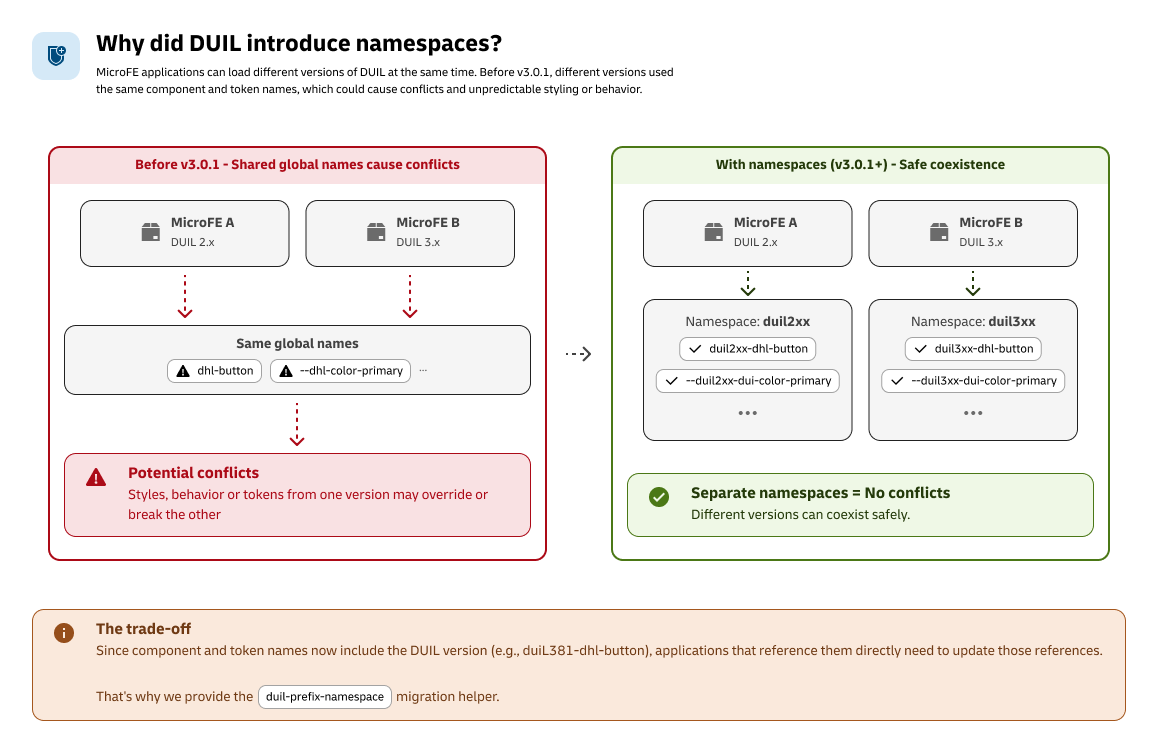
DUIL v3.0.1 introduces version-namespaced components and CSS tokens. This allows different DUIL versions to coexist in microFE applications without components and styles from one version interfering with another.
If your application directly uses DUIL components, CSS tokens, or custom selectors targeting DUIL components, run the migration helper after upgrading.
npm i @dhl-official/react-library@3.0.1 --save-exact \
  && npm i @dhl-official/tokens@3.0.1 --save-exact \
  && npx duil-prefix-namespace --write
The @dhl-official/react-library and @dhl-official/tokens versions must match.
1. Do I need to migrate?
The migration is required if your application contains any of these:
Component tags
<duil301-dhl-button>
<duil301-dhl-input-field>
Or references such as:
document.querySelector("duil301-dhl-button");
CSS tokens
border-radius: var(--duil301-dui-size-radius-md);
color: var(--duil301-dui-colors-foreground-primary);
Custom component styling
duil301-dhl-button a {
  /* custom styling */
}
If your application does not directly reference DUIL component tags, tokens, or selectors, no source-code migration is required.
2. What changed?
DUIL components and tokens now include the DUIL version in their namespace.
| Before v3.0.1 | After v3.0.1 |
|---|---|
duil301-dhl-button | duil301-dhl-button |
HTMLDuil301DhlButtonElement | HTMLDuil301DhlButtonElement |
--duil301-dui-size-radius-md | --duil301-dui-size-radius-md |
DUIL 3.0.1 → duil301-duil301-dhl-button
DUIL 3.0.2 → duil302-duil301-dhl-button
The 301 in duil301 represents DUIL 3.0.1.
When you upgrade DUIL, the namespace changes with the version.
This means different DUIL versions can be loaded by different microFEs without using the same component and token names.
3. Run the migration
DUIL provides duil-prefix-namespace to automatically update your source code.
Preview the changes
Before modifying anything, run:
npx duil-prefix-namespace --dry-run
This shows which files contain DUIL references that need to be updated.
Apply the changes
Once you're happy with the result:
npx duil-prefix-namespace --write
The migration helper handles:
- DUIL component tags
- Stencil HTML element types
- DUIL CSS tokens
- Previously namespaced components and tokens
- References used by tests
It preserves HTML/JSX attributes and expressions that should not be namespace-transformed.
Run --dry-run first, review the files, then run --write.
4. Upgrade DUIL
From v3.0.1 onwards, the namespace migration is part of the standard DUIL upgrade process.
Use the following command when upgrading to a new version:
npm i @dhl-official/react-library@<version> --save-exact \
  && npm i @dhl-official/tokens@<version> --save-exact \
  && npx duil-prefix-namespace --write
For example:
npm i @dhl-official/react-library@3.0.1 --save-exact \
  && npm i @dhl-official/tokens@3.0.1 --save-exact \
  && npx duil-prefix-namespace --write
Always install the same version of:
@dhl-official/react-library@dhl-official/tokens
If the versions don't match, DUIL styles may not render correctly.
If the namespace migration is not run, your application may still reference the old component and token names.
This can cause the application build to fail.
5. MicroFE applications
If your application is a microFE, there is one additional setup required:
Each microFE must initialize its own DUIL instance.
01 → Add the DUIL initialization
Add the following to the root application file that is exposed to the shell:
import "@dhl-official/tokens/index.css";
import { initDUIL } from "@dhl-official/react-library";

initDUIL();
02 → Find the exposed entry point
Check your webpack.config.js to see which application entry point is exposed:
exposes: {
  './App': './src/App',
}
The DUIL initialization should be located in the corresponding exposed application entry point.
For example:
webpack.config.js
      │
      └── './App'
            │
            ▼
        src/App.tsx
            │
            ├── import '@dhl-official/tokens/index.css'
            ├── import { initDUIL }
            └── initDUIL()
03 → Check before adding
Before adding the initialization, check whether initDUIL() is already called in the exposed application entry point.
If it is already there, do not add it again.
Migration checklist
Follow these steps when upgrading to a new DUIL version.
01 → Update DUIL packages
Upgrade @dhl-official/react-library and @dhl-official/tokens to the same version.
02 → Preview the migration
Run npx duil-prefix-namespace --dry-run and review the files that will be changed.
03 → Apply the migration
Run npx duil-prefix-namespace --write.
04 → Check your microFE setup
If you're using microFEs, verify that initDUIL() is called from the exposed application entry point.
05 → Build & test
Build the application and run your tests to make sure everything works as expected.
Every DUIL upgrade from v3.0.1 onwards requires the namespace migration step.
npx duil-prefix-namespace --write